centos 8 设置自定义SSH端口

charlie166
01月 11,2021
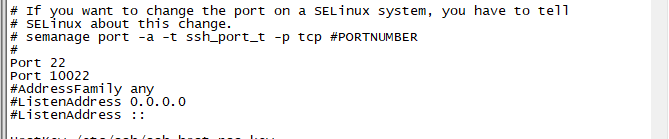
- 修改ssh配置文件 sudo vim /etc/ssh/sshd_config 找到 Port 22 行,去掉注释并在后面添加自定义端口
> #If you want to change the port on a SELinux system, you have to tell
> #SELinux about this change.
> #semanage port -a -t ssh_port_t -p tcp #PORTNUMBER
>  Port 22
> Port 10022
> #AddressFamily any
> #ListenAddress 0.0.0.0
> #ListenAddress ::
- 开启端口
sudo semanage port -l | grep ssh
sudo: semanage: command not found
安装工具: sudo dnf install policycoreutils-python-utils
开放端口: sudo semanage port -a -t ssh_port_t -p tcp 10022
- 设置防火墙
sudo firewall-cmd --state
输出: not running
启动防火墙: sudo systemctl start firewalld
放开自定义端口: sudo firewall-cmd --add-port=10022/tcp --permanent
重启防火墙: sudo firewall-cmd --complete-reload
- 重启SSH服务
sudo systemctl restart sshd
-
尝试使用自定义端口登录
-
登录成功. 删除默认端口并重启服务

0评论